- How to Import Cookies Using the "Get Token Cookie" Chrome Extension
Introduction
The "Get Token Cookie" Chrome extension not only allows you to extract cookies and tokens but also to import cookies into your browser. This guide will walk you through the steps to import cookies using this extension.
Installation
If you haven't already installed the "Get Token Cookie" extension, follow these steps:
-
Open Google Chrome: Ensure you are using the Google Chrome browser.
-
Visit the Chrome Web Store: Go to the Get Token Cookie Chrome Web Store page : chromewebstore.google.com/detail/get-token-cookie/naciaagbkifhpnoodlkhbejjldaiffcm
-
Add to Chrome: Click the "Add to Chrome" button on the extension page.
-
Confirm Installation: A pop-up will appear asking for confirmation. Click "Add Extension" to install the extension.
Importing Cookies
-
Prepare Your Cookies:
- Ensure your cookies are in a format that the extension can read. Typically, a JSON format is used for cookies.
- Example cookies format: wd=383x491;fr=0OZVyYntxBCJ069Xk.AWWOUPVbln2HPP4p7mOcj_CEBn4.Bmi24m..AAA.0.0.Bmlglx.AWUulUmub5A;xs=31%3AFEGkYbz0RMNZxA%3A2%3A1721108849%3A-1%3A-1;c_user=61562130597599;ps_n=1;m_page_voice=61562130597599;datr=9W2LZi2Fj186OSWmFFeLaism;sb=9W2LZt4wPWyLhDn9XTIznazt;ps_l=1;
-
Open the Extension:
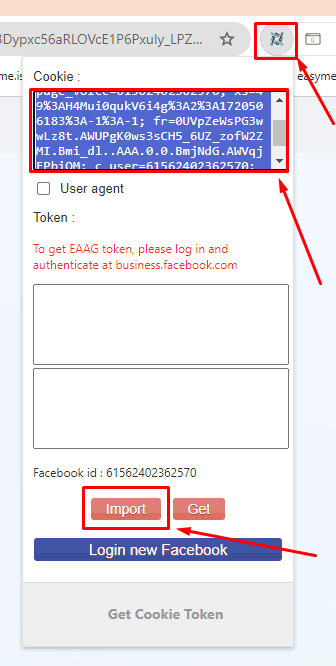
- Click on the "Get Token Cookie" icon located in the top-right corner of the Chrome browser (next to the address bar).
- If you don't see the icon, click the puzzle piece icon (extensions menu) and pin the "Get Token Cookie" extension for easier access.
-
Access Import Function:
- In the extension's interface, look for an option to import cookies. This is typically found in the settings or options menu within the extension.
-
Import the Cookies:
- Click the import button or link.
- A dialog box or input area will appear where you can paste your cookies .
- Paste your prepared cookies (or can pase all account detail) into the input area and confirm the import.
-
Verify the Import:
- After importing, navigate to the website for which you imported the cookies.
-------------------------------------------------------------------------------------------------------------------------------